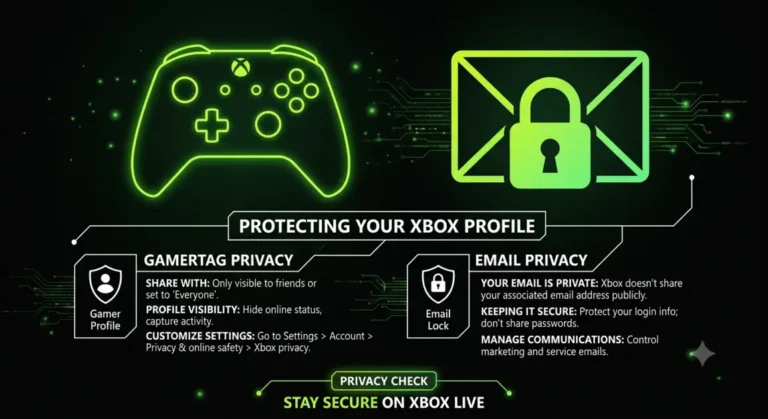
If you’re searching for a Xbox Gamertag email, here’s the honest answer upfront: you can’t find one, and that’s by design. Microsoft treats account emails as private data, completely separate from the public Gamertag identity. Anyone claiming to reveal an Xbox Gamertag email through a tool or service is either mistaken or running a scam.
Xbox Gamertag Email: Why It’s Not Public Information
A Gamertag is intentionally designed as a public-facing display name, while the email tied to a Microsoft account is treated as sensitive personal data, protected under Microsoft’s privacy policy and, for players in the EU/UK, GDPR regulations. There is no legitimate API, tool, or lookup service that converts a Gamertag into an email address. Anyone claiming otherwise is either mistaken or running a scam.
This separation exists for good reason. Gamertags are searchable and visible to other players by design, so anyone could look you up. If that same lookup exposed your email, it would open the door to spam, phishing, and account takeover attempts against literally every Xbox player.
Tip: Do not expect Xbox Support to share another person’s account details. Account information is normally discussed only with the verified owner of the account, which is the same privacy separation described above.
What Information Is Actually Public on Xbox Live
While the email itself is locked down, plenty of other profile data is genuinely public and viewable by anyone using a Gamertag lookup. Knowing this distinction helps you understand what a legitimate Xbox Gamertag Finder can and cannot show you.
- Gamertag and Gamerscore — public unless privacy settings restrict it
- Current online/offline status — visible depending on the player’s privacy settings
- Currently playing game — shown if the player hasn’t hidden it
- Achievements and game history — public by default on most accounts
- Reputation — shown on some profiles when Xbox provides it
None of this touches the email, real name, phone number, or payment details tied to the underlying Microsoft account — those remain private regardless of Gamertag visibility settings.
Beware of Tools Claiming to Reveal Emails
Searches for how to find an email from Xbox Live Gamertag often lead to sketchy third-party sites promising instant email reveals in exchange for a fee, a survey, or a download. These are almost universally scams or phishing attempts, and some go further, distributing malware disguised as a “lookup tool.”
Tip: If a site asks you to download software, complete a survey, or pay money to reveal someone’s email from a Gamertag, close the tab. No legitimate service can bypass Microsoft’s account privacy architecture, and any site claiming to is lying to extract money or personal data from you instead.
Legitimate Ways to Contact or Verify a Player
If your actual goal is reaching out to a player or confirming their identity, there are legitimate paths that don’t involve trying to expose private account data.
Send a Friend Request or Message
The built-in Xbox messaging system lets you contact any player directly through their Gamertag, without ever needing their email. Open their profile, select Message, and send your note directly through Xbox Live.
Use In-Game Party Chat
If you’re playing together, party chat and in-game voice communication accomplish the same goal as email contact, with no privacy concerns since it’s built into the platform.
Report Instead of Investigate
If your concern is a harassment or scam situation rather than legitimate contact, use Xbox’s built-in Report feature on the player’s profile. Microsoft’s enforcement team can act using the account data they already have securely, without exposing anything to you.
How to Find Your Own Xbox Account Email
If you’re actually trying to recover your own account email rather than someone else’s, that’s a completely different and fully supported process.
- Go to account.microsoft.com and try signing in with your Gamertag
- If you don’t remember the exact email, select “Forgot username”
- Microsoft will ask for recovery details (phone number, backup email) to help you retrieve it
- Once signed in, your account email is visible under Account Settings
If you’re also unsure of your Gamertag itself, our guide on how to find your Gamertag on Xbox One covers every method for locating it directly from your console or the Xbox App.
Frequently Asked Questions
Want to see what a gamertag lookup can really show? The Xbox Gamerscore Finder returns only public profile details such as Gamerscore, never an email address.