- Quick Answer
- How the Same Xbox Gamertag System Works
- Before 2019: Gamertags Had to Be Unique
- What the Gamertag Suffix Looks Like
- Why Microsoft Allowed Duplicate Gamertags
- Does Sharing a Gamertag Affect Your Account?
- How to Get a Gamertag Someone Else Already Has
- Common Mistakes When Dealing With Gamertag Suffixes
- Frequently Asked Questions
If you’ve ever tried to claim a gamertag and gotten a message that it’s taken, you might wonder whether two people can actually end up with the same Xbox gamertag anyway. The short answer is yes — since late 2019, Xbox has allowed two accounts to have the same Xbox gamertag, separated only by a small numeric suffix most players never even notice. This guide explains exactly how that system works, why Microsoft built it, and what it means for you if you’re chasing a name that’s already taken.
Quick Answer
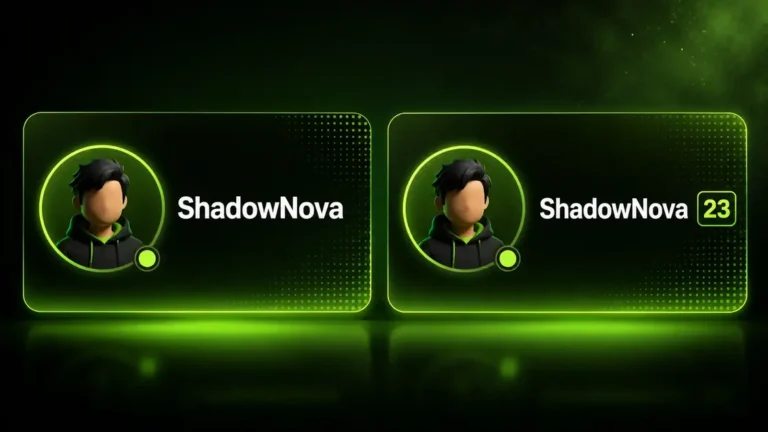
Yes, two Xbox players can have the same Xbox gamertag today. Microsoft ended strict gamertag uniqueness in November 2019, replacing it with a hidden numeric suffix (like #4821) that gets attached whenever your chosen name is already in use. You’ll still type and display the name you want — the suffix mostly stays out of sight unless there’s a mix-up to resolve.
How the Same Xbox Gamertag System Works
Every Xbox account is built on a permanent internal ID called an XUID, which never changes and is never reused. Your gamertag — the name people actually see — sits on top of that ID. Because two accounts can point to two different XUIDs while showing the same Xbox gamertag on screen, Xbox needed a lightweight way to tell the two apart only when it actually matters.
That’s where the suffix comes in. If you set your name and someone already has it, Xbox appends a short numeric tag after a hashtag, so your profile might read “GamerTag#1234” behind the scenes. Under Microsoft’s own display guidelines for developers, the modern gamertag format shows up to 12 characters of your chosen name followed by the # symbol and suffix number whenever one is present.
Before 2019: Gamertags Had to Be Unique
Prior to November 2019, the rule was strict: only one account on all of Xbox Live could ever hold a given gamertag. Early adopters scooped up short, memorable names, and everyone else was left picking from whatever hadn’t already been claimed — even by accounts that had gone inactive for years.
This scarcity is the entire reason Microsoft eventually changed the system. With millions of new players joining every year and a fixed pool of short, clean names, something had to give.
What the Gamertag Suffix Looks Like
When your name matches someone else’s, Xbox shows the suffix in a smaller font next to your gamertag — a bit like how some chat platforms once separated identical usernames with a short numeric tag. In practice, most players never see anyone’s suffix at all. It typically only shows up in a few specific places:
- Friend requests, when two people share a name
- Search results inside gamertag lookup tools
- Certain in-game leaderboards and messaging screens
If you were the very first account to ever claim a name, you keep it with no suffix attached, and nothing changes for you.
Quick tip: The suffix is tied to your account, not chosen by you — you can’t pick your own number, and it can change if you later switch gamertags.
Why Microsoft Allowed Duplicate Gamertags
Microsoft framed the change as a fairness fix. Xbox had grown into one of the largest gaming platforms in the world, and a strict-uniqueness system simply couldn’t keep up with that many new sign-ups competing over an increasingly picked-over pool of names. Allowing the same Xbox gamertag to exist on more than one account meant nobody had to settle for an ugly workaround, like tacking on random letters, just to get something close to what they actually wanted.
Does Sharing a Gamertag Affect Your Account?
No. Having the same Xbox gamertag as another player doesn’t touch your Gamerscore, achievements, friends list, purchase history, or save data — all of that is tied to your XUID, not your display name. The two accounts function completely independently; the shared name is purely cosmetic.
The one place it can get mildly confusing is voice chat or party callouts, where two players with an identical name might cause a moment of “wait, which one of you just said that?” Outside of that, it’s a non-issue.
How to Get a Gamertag Someone Else Already Has
If the name you want already belongs to another player, you don’t need to get creative with symbols anymore — you can usually just claim it as-is and let Xbox handle the suffix automatically.
- Go to your profile settings and choose to change your gamertag.
- Type the exact name you want, even if it initially shows as unavailable.
- If it’s genuinely in use, Xbox will typically offer it to you with a suffix attached, or suggest close variations.
- Confirm the change — remember you only get one truly free rename before Xbox starts charging for future changes.
Before you commit, it’s worth checking whether someone already holds the same Xbox gamertag using a tool like the Xbox Gamertag Availability Checker, so you know exactly what you’re getting. If you’d rather browse fresh ideas instead of chasing a taken name, the Xbox Gamertag Generator can suggest alternatives that don’t need a suffix at all.
Common Mistakes When Dealing With Gamertag Suffixes
- Assuming a suffix means something went wrong — it’s just Xbox’s way of separating players who share the same Xbox gamertag, not a punishment.
- Spending your one free rename chasing a taken name without checking first — confirm availability before you commit.
- Confusing the visible suffix with your XUID — the suffix is cosmetic, while your XUID is the permanent ID other services actually use to identify you. You can confirm how your own profile displays with the Xbox Gamertag Finder.
- Assuming friends will always see your suffix — most of the time it stays completely hidden.