Xbox gamertag naming rules control what you can and can’t type into that name field when you set up or change a gamertag — and getting it wrong means an instant rejection or, worse, a forced rename down the line. Microsoft runs every gamertag through both automated filters and, in some cases, human review, so understanding Xbox gamertag naming rules upfront saves a lot of back-and-forth.
Quick Answer
Quick Answer: Xbox gamertag naming rules require gamertags to be 3–15 characters when the name is unique and available (3–12 if Xbox adds a numeric suffix or the name uses non-Latin characters), using only letters, numbers, and spaces (no symbols or punctuation), starting with a letter, and containing no profanity, hate speech, impersonation of Microsoft/Xbox staff, or sexually explicit content. Violations can get a gamertag rejected at signup or force-changed later, even after it’s been in use.
What’s Allowed Under Xbox Gamertag Naming Rules
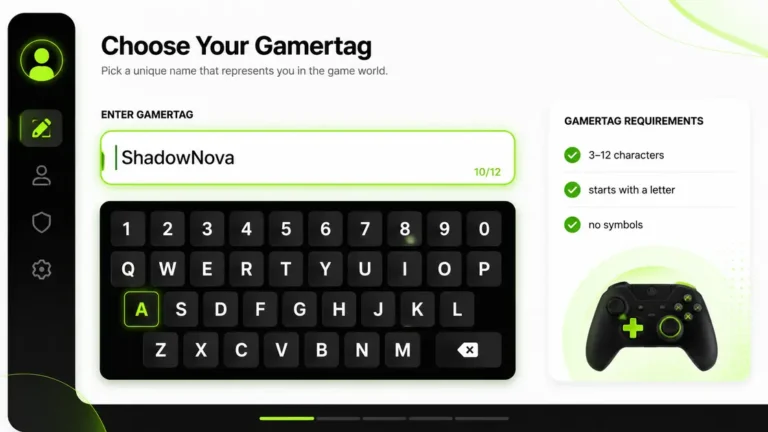
The technical side of Xbox gamertag naming rules is fairly simple. A gamertag has to fit within a fixed set of formatting limits before Xbox even checks the content for anything inappropriate.
| Rule | Requirement |
|---|---|
| Length | 3 to 15 characters for unique, available names; 3 to 12 for names that need a numeric suffix or use non-Latin characters |
| Allowed characters | Letters (A–Z), numbers (0–9), and single spaces |
| Starting character | Must start with a letter, not a number or space |
| Spaces | Allowed, but not consecutive (no double spaces) |
| Symbols/punctuation | Not allowed (no underscores, hyphens, periods, emojis) |
| Case sensitivity | Not case-sensitive — “MajorNelson” and “majornelson” are the same gamertag |
Within those limits, gamertags don’t need to be dictionary words. Made-up names, gaming references, and combinations of letters and numbers are all fine, as long as the result doesn’t fall into any of the banned categories below. You can check whether a specific name is currently free using the Xbox Gamertag Availability Checker, or generate compliant name ideas with the Xbox Gamertag Generator.
What’s Banned in an Xbox Gamertag
Content-wise, Xbox gamertag naming rules exist to keep the platform usable for players of all ages, so the banned list is broader than most people expect.
| Category | Examples of What Gets Rejected |
|---|---|
| Profanity and slurs | Explicit language, hate speech, and common variations designed to dodge filters |
| Sexual content | Explicit terms, innuendo, and anything referencing sexual acts |
| Impersonation | Names implying you’re Xbox staff, Microsoft employees, or moderators (e.g. “XboxSupport”, “MicrosoftAdmin”) |
| Threats and harassment | Names referencing violence, self-harm, or targeted harassment of a person or group |
| Drug references | Names promoting illegal drug use or sales |
| Real brand/trademark misuse | Names implying official affiliation with a company or franchise |
How Xbox Enforces These Rules
Most rejections happen instantly at signup — the system checks the name against its filters before the account is even created. But enforcement of Xbox gamertag naming rules doesn’t stop there.
Gamertags already in use can also get flagged later, usually after being reported by another player. According to Xbox’s Community Standards, accounts found with a violating gamertag can be forced to change it, and the account may also face broader enforcement action depending on the severity and history of violations.
If a gamertag gets force-changed, Xbox typically assigns a temporary replacement and requires the player to pick a new, compliant name before continuing to use online features fully.
Quick Rules at a Glance
- Stick to letters, numbers, and spaces — no symbols, no punctuation, no emojis, plain text only.
- Keep it 3–15 characters — 3–12 if the name needs a numeric suffix or uses non-Latin characters; anything outside those limits will be rejected automatically.
- Avoid anything borderline — if a word could be read as offensive out of context, it’s safer to skip it entirely.
- Don’t imply you’re staff — names suggesting Xbox or Microsoft affiliation are rejected outright.
Choosing a Compliant Gamertag
Once you understand Xbox gamertag naming rules, picking a name that sticks the first time becomes much easier than guessing and getting rejected repeatedly.
- Draft a few name ideas — write down 3–5 options that fit the character and format limits above.
- Self-check for anything borderline — read each option out loud and check for hidden words, leetspeak, or unintended meanings.
- Check availability — run your top choice through the Xbox Gamertag Availability Checker to confirm it’s free to claim.
- Claim it on your device — set the gamertag through your console, the Xbox app, or xbox.com once you’ve confirmed it’s available and compliant.
Once your gamertag is live, you can look up how it appears publicly — including Gamerscore, tier, and online status — using the Xbox Gamertag Finder, and track your Gamerscore over time with the Xbox Gamerscore Finder. Following Xbox gamertag naming rules from the start saves you the hassle of a forced rename later.
Frequently Asked Questions
Ready to pick your gamertag? Check if your ideal name is free, or generate fresh ideas that follow all the naming rules above.